Libejovo
This library is a scientific library that represents a comprehensive summary of the applied mathematics that I've learned at engineering school. The internals of the library revolve around the Matrix data structure that allows a unified and simple approach to allocating memory for arrays, accessing elements, and interacting with the data from a high-level approach.
Goals
This project is an organic application of the concepts that I'm studying. It's intent is to master and internalize the fundamental routines of scientific computing, establish good habits, practice writing documentation for an audience, aquiring an intimate understanding of the difficulties of implementing numeric routines, deepen the application side of the mathematics, master the C programming language, and much much more.
Bite-sized Introduction
This section will briefly introduce the user-facing functions that are used to dictate Matrix operations. For more information, see matrix.
Instantiation
To allocate the memory for a new, fixed-size double container called a Matrix, call TYPED(Matrix_new):
Matrix *m = TYPED(Matrix_new)(10, 4); // Create a 10 x 4 matrix full of zeros
TYPED(Matrix_new)(10, 4) creates a new 10 x 4 matrix - a matrix with 10 rows and 4 columns whose every element is 0. The function returns a pointer because the new Matrix is in charge of a (potentially) large block of memory and must be freed appropriately upon deconstruction. Notice how TYPED(Matrix_new) addopts a sort of OOP approach where an object Matrix performs a verb new. Pay attention to this pattern as it will guide the philosophy for the user-facing API provided in this library.
Releasing Memory
Equally important as allocating memory is freeing it. Use the function TYPED(Matrix_free) to release the memory associated with a matrix.
TYPED(Matrix_free)(m); // Does not nullify m
This function will release the memory both held by the pointer pointing to the matrix's data and by the memory pointed to by m itself. Since we only pass in m and not the address of m, this function cannot actually nullify m after freeing the memory associated, and it is therefore in violation of CERT's security standards. We reccomend calling TYPED(Matrix_reset) to free all of the memory controlled by m and to nullify the pointer m afterwords.
Consider:
TYPED(Matrix_reset)(&m); // Nullifies m
Constructors
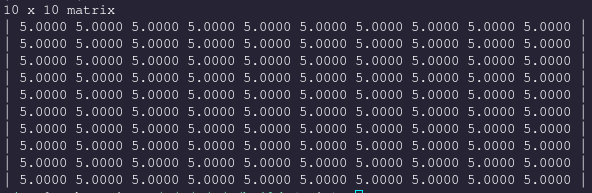
We can create a new constant Matrix whose every element is k with TYPED(Matrix_value):
m = TYPED(Matrix_value)(10, 10, 5); // Create a 10 x 10 matrix of all 5s
Print a Matrix with TYPED(Matrix_print). Notice again the noun-verb combination.
TYPED(Matrix_print)(m);
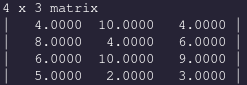
We can create an m by n Matrix whose elements are sampled from an iid uniform distribution of integers belonging to {0, ... , 10} with TYPED(Matrix_rand)(m, n)
TYPED(Matrix_reset)(&m);

m = TYPED(Matrix_rand)(4, 3);
TYPED(Matrix_print_fixed)(m); // %6.4lf as format descriptor
or belonging to {a, ... , b} with TYPED(Matrix_random)(m, n, a, b)
TYPED(Matrix_reset)(&m);

m = TYPED(Matrix_random)(8, 13, 0, 200);
TYPED(Matrix_print_fixed)(B); // %6.4lf format descriptor per element

TYPED(Matrix_reset)(&m);

A Vector is a type-alias for a Matrix that communicates intent of working with a Matrix that is a 1-dimensional column (or row) vector.
We can create a new Vector that is a sample from the Normal distribution X ~ N(a, b):
TYPED(Vector)*v = TYPED(Vector_runif)(100, -3, 8);
The default output of most Vector constructors is a column vector (a Matrix whose nrows == 1). We can print the first n elements with the TYPED(Vector_print_head)(A, n) function
TYPED(Vector_print_head)(v, 15);

Super important and frequent in scientific applications is the beloved linspace, implemented with the function TYPED(Vector_linspace)(start, end, n):
TYPED(Matrix_reset)(&v);

v = TYPED(Vector_linspace)(0, 25, 9);
TYPED(Matrix_print)(v);

TYPED(Matrix_reset)(&v);
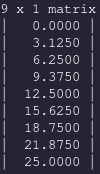
Note that n in the call to linspace is the size of the resulting Vector.
Check out the Constructors section in Matrix for other ways to construct a Matrix
Data Analysis
We can wrap up a series of vectors that have the same length along with a string that gives us a meaningful descriptor of the data into a new structure, the DataFrame. Readers who have used R or Python's Pandas for data science will be familiar with the DataFrame in theory and in practice.
Available at our disposal are the fundamental statistics routines to gather information about the data in a Vector.
Here we showcase just a few of these functions:
double u_v      = mean(v);
double s_v      = std(v);
double min_v    = min(v);
double max_v    = max(v);
double var_v    = var(v);
These statistical routines are not prefixed with a unique identifier like TYPED(Vector_). Therefore, we acknowlege that this may change in the future or this might provide namespace conflicts for other projects.
Other routines that are similar but have more use in Linear Algebra will be prefixed:
double norm_v   = TYPED(Vector_pnorm)(v, 2);
double norm_v   = TYPED(Vector_inner)(v, v);
 TYPED(Vector)*v_proj  = TYPED(Vector_project_onto)(v, v);
DataFrame
A DataFrame is simply a pointer to a Chain (A linked list of Strings) and a pointer to a Space (A linked list of Vectors. I chose the word Space to evoke the notion of a vector space). We can create a new Chain and a new Space with the variadic functions newChainVar(n, ...) and newSpaceVar(n, ...). The first parameter indicates how many parameters we are passing into the function:
int n = 100;

Chain *c = newChainVar(3, "Discrete uniform", "Continuous Uniform", "Standord Normal");
Space *s = newSpaceVar(3, TYPED(Vector_rand)(n), TYPED(Vector_runif)(n, -5, 5), TYPED(Vector_rnorm)(n, 0, 1));

DataFrame *df = newDataFrame(c, s);
printDataFrame(df);

Readers familiar with the tidyverse will recognize this presentation. We invite yout to notice the new functional style approach with newChainVar, printDataFrame, as opposed to Chain_new_var and DataFrame_print.
We can compute the mean of the nth (zero-based indexing) col of df as:
printf("Mean: %lf\n", mean(getColDF(df, 2))); // get the THIRD column of df
printf("std:  %lf\n",  std(getColDF(df, 2)));
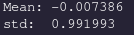
The mean and standard deviation are what we expect from a random variable X ~ N(0, 1). As we increase the size of our vector, n, the values will approach 0 and 1.
To export our data in a format that we can plot in Python or R, we use the createCSV(df, filename) function:
createCSV(df, "df.csv");